
AI Watermark Remover
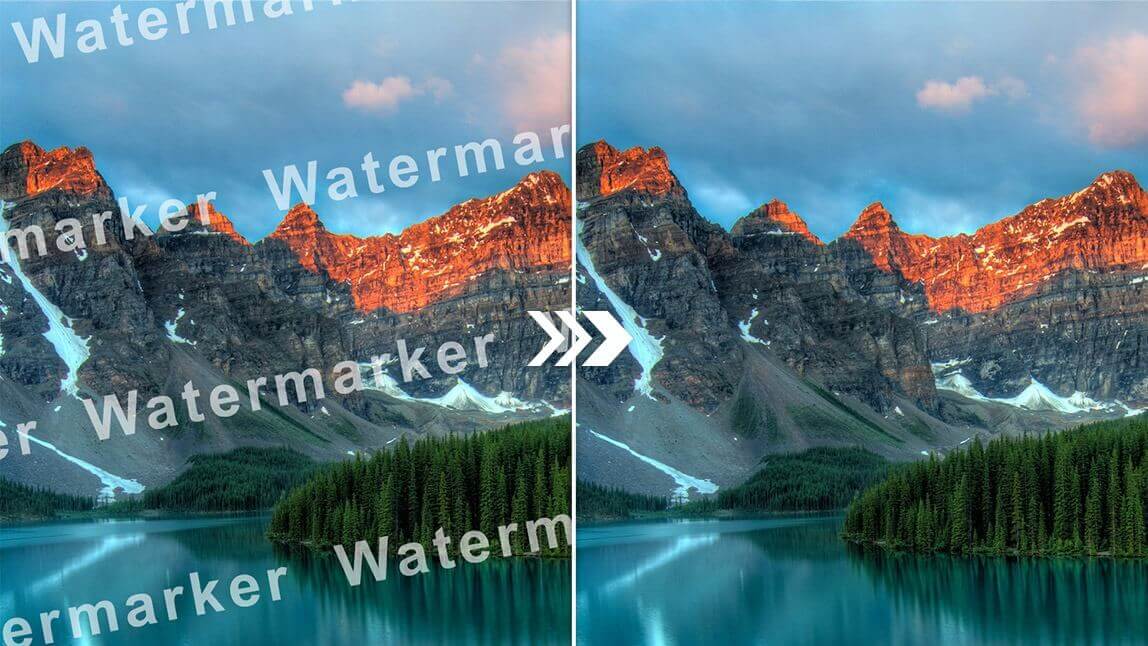
Upload a photo, mark the unwanted logo, and let this AI Watermark Remover rebuild the background. Get natural, high-resolution results in seconds.
Feedback
AI Tools
Explore AI tools
MiniMax H3
MiniMax H3 AI Video Generator
Seedance 2.5
The Future of AI Video Is Here.

Seedance 2.0
The Future of AI Video Is Here.

Veo3.1
Create Stunning Videos with Veo3.1
FLUX 3 Video Generator

Kling 3.0
Next-Gen AI Video Generator
Grok Video Generator
Create Videos from Text or Images with AI
MiniMax H3 video generator
MiniMax H3 AI Video Generator

Inside the AI Watermark Remover: How Clean-Up Works
The engine traces logos, captions, and stamps, then repaints the pixels beneath them so textures, gradients, and film grain stay exactly as they were.
- Queue Many PhotosDrop in a whole folder and let the queue run while you get on with other work.
- Smart Mark DetectionEach image is scanned for repeating logos and translucent stamps, then outlined for your review.
- Texture-Aware RepairRebuilt areas inherit surrounding color and grain, so no smudges or blurry patches remain.
How the AI Watermark Remover Works in Three Steps
Upload the file, confirm the area you want gone, and download a clean copy — the whole workflow takes under a minute.
Why Creators Pick This AI Watermark Remover
One workspace covers stock photos, marketplace listings, social exports, and scanned documents — no plugins, no desktop install, no learning curve.
Bulk Queue
Load dozens of files at once and export them together when the queue finishes.
Pattern Recognition
Repeating logos and semi-transparent overlays are located without manual tracing.
Edge-to-Edge Marks
Diagonal ribbons and full-frame overlays are handled just as cleanly as corner stamps.
Seconds, Not Minutes
Most images come back within a few seconds, even at full resolution.
Color-Matched Fill
Gradients, shadows, and skin tones are carried across the repaired area.
Original Quality Out
Nothing is downscaled — you get back the same pixel dimensions you uploaded.
Questions About Our Watermark Cleanup Tool
Short answers on speed, quality, file limits, and pricing for the AI Watermark Remover — everything worth knowing before your first upload.
What exactly does this tool do?
It is a browser-based cleaner that finds logos, captions, and stamps on a photo and repaints the pixels underneath, so the picture looks like the mark was never there.
Can I clean several photos at once?
Yes — drop in a batch and each file is processed in turn; the queue keeps running while you continue browsing.
How long does one image take?
Typically a few seconds. Large files or heavy overlays may need up to a minute, and the progress bar keeps you posted.
Will the repair leave blurry patches?
No. The fill borrows grain, color, and lighting from nearby pixels, so the repaired spot blends into the rest of the frame.
Do I need to pay or sign up?
You can start cleaning images without a subscription; paid credits only come into play for high-volume or premium model runs.
Which kinds of marks can it erase?
Stock agency stamps, social handles, price tags, date imprints, and translucent full-frame overlays are all within scope.
Your Photo, Minus the Watermark
Drop an image in, let the AI Watermark Remover rebuild what was hidden, and download a crisp, mark-free file. No install, no signup, no cost to start.